Medical Data Mapping, Benchmarked
Portiere turns clinical source data into OMOP CDM and FHIR R4 with AI-assisted schema and concept mapping — and publishes the numbers to prove it. Half the workload routes itself; your reviewers start from ranked candidates, not a blank search box.
ICD-10-CM → SNOMED · n = 1,000 · Athena 2026-04-30 · full scoreboard below
The Problem
Vocabulary mapping is where migrations stall
Every OMOP or FHIR adoption hits the same wall: thousands of local codes that someone must match, one by one, to standard concepts.
Thousands of codes, one search box at a time
A single hospital migration means matching thousands of distinct source codes against hundreds of thousands of standard concepts. Today that is a terminologist, a search box, and months of repetitive lookups.
The same work, repeated at every site
Every institution maps the same ICD-10 codes to the same SNOMED concepts — then locks the result in a spreadsheet. No confidence signal, no audit trail, no way to reuse the effort.
The standard tooling is string matching
The de-facto tool, OHDSI Usagi, ranks candidates by TF-IDF text similarity and leaves every single decision to the reviewer. Nothing tells you which mappings are safe to accept and which need a human.
Why Portiere
Automate what's safe. Queue what isn't.
Portiere does not pretend to be an autonomous mapper. It retrieves candidates with hybrid search, reranks them with a cross-encoder, and routes every code by confidence — machines handle the routine half, humans get ranked candidates for the rest. Measured on 1,000 ICD-10-CM → SNOMED mappings at default thresholds:
Auto-accept
51.8%518 of 1,000 codes
High-confidence mappings skip review entirely and flow straight into ETL. Half the workload never reaches a human — that is the throughput economics teams actually buy.
Needs review
31.7%317 of 1,000 codes
Reviewers confirm from ranked candidates instead of a blank search box. Across the benchmark, the right concept is on screen in the top 10 for 58.8% of queries.
Manual
16.5%165 of 1,000 codes
Genuinely hard codes are flagged honestly instead of guessed. Your terminologists spend their time where they are irreplaceable.
Retrieval + reranking, not string similarity
Hybrid lexical and biomedical-embedding search, reranked by a cross-encoder.
Thresholds you control
Tune the auto/review cutoffs to your own risk tolerance — routing is policy, not magic.
Human-in-the-loop by design
A local review UI and a CSV round-trip for clinical SMEs are built into the workflow.
Open source, local-first, BYO-LLM
Apache 2.0. Your vocabularies, embeddings, and PHI never leave your machine.
What Portiere Does
Five stages from raw tables to validated ETL
One project object drives the whole transformation — every stage inspectable, every decision overridable.
Ingest
Connect CSV, Parquet, or database tables through Spark, Polars, or Pandas engines.
Profile
Row counts, distributions, and candidate code columns — know the source before mapping it.
Schema Map
Source columns matched to OMOP CDM or FHIR R4 tables and fields, each with a confidence score.
Concept Map
Source codes to standard concepts: retrieve candidates, rerank, route by confidence.
ETL + Validate
Generate production ETL scripts and a validation report — from approved mappings only.
Human checkpoint — between mapping and ETL, every needs_review item passes through the local review UI or an SME CSV round-trip. Approvals persist alongside your source-of-truth YAML, and ETL runs on approved mappings only.
The Proof
Benchmarked in the open
ICD-10-CM → SNOMED concept mapping on 1,000 gold-standard pairs, Athena vocabulary release 2026-04-30. Every Portiere configuration beats the OHDSI Usagi baseline.
| Configuration | top-1 | top-5 | top-10 | MRR |
|---|---|---|---|---|
| BM25 + rerankerbest | 0.303 | 0.533 | 0.588 | 0.402 |
| Hybrid + reranker | 0.286 | 0.505 | 0.587 | 0.377 |
| FAISS + reranker | 0.285 | 0.462 | 0.546 | 0.363 |
| OHDSI Usagi 1.4.3baseline | 0.262 | — | — | — |
Where 1,000 codes went
Routing at default thresholds
- Auto-accept51.8%
- Needs review31.7%
- Manual16.5%
Thresholds are configuration, not fate — tighten them for safety, loosen them for throughput.
The bug we published
Our v0.3.x numbers said the reranker made results worse and plain BM25 “won.” We suspected a score-normalization defect in hybrid blending, pre-registered the hypothesis, fixed it, and re-ran the ablation. With the reranker switched off, BM25 reproduced the old “winning” row to the third decimal (0.288) — the old table had silently been measuring retrieval-only.
Post-fix, the reranker helps every backend it touches (+1.5pt on BM25, +2.4pt on FAISS) and the hybrid anomaly is gone. If we publish our own bugs, you can trust our wins.
Read the fine print — we did
- Usagi is a TF-IDF tool — beating it is the entry ticket for an ML mapper, not a coronation. Every Portiere configuration clears that bar, worst config by +2.3pt, best by +4.1pt absolute.
- 0.303 top-1 is not autonomous-mapping territory, and Portiere does not claim to be one. The product is assisted mapping: confidence routing plus ranked candidates for reviewers.
- Usagi was scored from its UI export — top-1 only, since the jar has no headless mode. Its workflow is top-1-centric by design, so the comparison hits its intended use.
- The next number we will publish: auto-tier precision — of the 518 auto-accepted codes, how many were right. Planned for v0.4.x.
Full methodology and the benchmark harness live in the open — github.com/cuspal/portiere · docs.cuspal.co
Built for Clinical Data Engineers by Clinical Data Engineers
5-Stage Pipeline
Ingest, profile, schema-map, generate ETL, and validate — fully automated with AI-assisted confidence routing.
OMOP CDM + FHIR R4
Map to OMOP CDM v5.3/v5.4 or FHIR R4 with vocabulary-aware concept matching across SNOMED, LOINC, RxNorm, and more.
Hybrid Search
Dense vector (FAISS + SapBERT/OpenAI/Ollama) combined with BM25 lexical and Elasticsearch full-text search, fused with Reciprocal Rank Fusion. Choose your embedding and reranking provider.
BYO-LLM
Use OpenAI, Anthropic, Azure, Ollama, or AWS Bedrock. Your data stays under your control with any LLM provider.
9 Vector Store Backends
FAISS, BM25s, Elasticsearch, ChromaDB, PGVector, MongoDB Atlas, Qdrant, Milvus, or Hybrid — pick the backend that fits your infrastructure. All run locally.
100% Open Source
Apache 2.0-licensed. Run everything locally — your data never leaves your machine. No cloud dependency, no vendor lock-in, no usage limits.
The Same Pipeline, in Code
Connect Your Data
Point Portiere at your CSV, Parquet, or database tables. Choose your engine — Spark for scale, Polars for speed, Pandas for simplicity.
import portiere
from portiere.engines import PolarsEngine

project = portiere.init(
    name="Hospital Migration",
    engine=PolarsEngine(),
    target_model="omop_cdm_v5.4",
    vocabularies=["SNOMED", "LOINC", "RxNorm", "ICD10CM"],
)

source = project.add_source("patients.csv")
print(source.profile())
# Source: patients.csv | 48,231 rows × 11 cols | engine: polarsAI Maps Everything
Schema mapping + concept mapping with confidence routing. High-confidence items auto-accept; the rest queue for human review.
schema_map = project.map_schema(source)
concept_map = project.map_concepts(source=diagnoses_source)

print(schema_map.summary())
# {'total': 11, 'auto_accepted': 9, 'needs_review': 2}

print(concept_map.summary())
# {'total': 15, 'auto_mapped': 12, 'needs_review': 3}Review & Generate ETL
Approve, override, or reject mappings. Generate production-ready ETL scripts. Export for clinical SME review or load directly.
# Review and approve mappings
schema_map.approve("patient_id")
schema_map.override("lab_date",
    target_table="measurement",
    target_column="measurement_date")
concept_map.approve("E11.9")

# Generate ETL and validate
etl = project.run_etl(source, output_dir="./output")
report = project.validate(etl_result=etl)
print(report.summary())
# ✓ 11/11 columns mapped | 3 ETL scripts | 0 validation errors

# Export for SME review
concept_map.to_csv("concept_review.csv")
Choose Your Search Backend
Plug in the retrieval strategy that fits your use case. All backends run locally — no data leaves your machine.
BM25s Lexical Search
Fast lexical search using BM25s. Zero dependencies, runs entirely in-process. Great for exact terminology matching and quick prototyping.
from portiere import PortiereConfig, KnowledgeLayerConfig

config = PortiereConfig(
    knowledge_layer=KnowledgeLayerConfig(
        backend="bm25s",                     # Lexical search
        bm25s_corpus_path="./vocab/concepts.json",
    ),
)
FAISS Semantic Search
Dense vector search with SapBERT biomedical embeddings. Best for finding semantically similar concepts even when terminology differs.
from portiere import PortiereConfig, KnowledgeLayerConfig
from portiere.config import EmbeddingConfig

config = PortiereConfig(
    knowledge_layer=KnowledgeLayerConfig(
        backend="faiss",                     # Dense vector search
        faiss_index_path="./vocab/concepts.index",
        faiss_metadata_path="./vocab/concepts.meta.json",
    ),
    embedding=EmbeddingConfig(
        provider="huggingface",              # Or "openai", "bedrock", "ollama"
        model="cambridgeltl/SapBERT-from-PubMedBERT-fulltext",
    ),
)
Elasticsearch Full-Text
BM25 full-text search powered by an existing Elasticsearch cluster. Ideal for large vocabularies and teams that already run ES infrastructure.
from portiere import PortiereConfig, KnowledgeLayerConfig

config = PortiereConfig(
    knowledge_layer=KnowledgeLayerConfig(
        backend="elasticsearch",             # ES full-text search
        elasticsearch_url="http://localhost:9200",
        elasticsearch_index="omop_concepts",
    ),
)
ChromaDB
Embedded vector database with automatic persistence. No external services needed — perfect for local development and small-to-medium vocabularies.
from portiere import PortiereConfig, KnowledgeLayerConfig

config = PortiereConfig(
    knowledge_layer=KnowledgeLayerConfig(
        backend="chromadb",                  # Embedded vector DB
        chroma_persist_path="./vocab/chroma/",
    ),
)
PGVector
PostgreSQL-native vector search via the pgvector extension. Use your existing Postgres infrastructure for both relational data and vector similarity search.
from portiere import PortiereConfig, KnowledgeLayerConfig

config = PortiereConfig(
    knowledge_layer=KnowledgeLayerConfig(
        backend="pgvector",                  # Postgres vector search
        pgvector_connection_string="postgresql://user:pass@localhost:5432/vocab",
        pgvector_table="concept_embeddings",
    ),
)
MongoDB Atlas Vector Search
Vector search on MongoDB Atlas. Ideal if your organization already runs MongoDB and you want a single platform for documents and embeddings.
from portiere import PortiereConfig, KnowledgeLayerConfig

config = PortiereConfig(
    knowledge_layer=KnowledgeLayerConfig(
        backend="mongodb_atlas",             # MongoDB Atlas vector search
        mongodb_uri="mongodb+srv://user:pass@cluster.mongodb.net/",
        mongodb_database="portiere",
        mongodb_collection="concept_embeddings",
    ),
)
Qdrant
High-performance vector search engine with advanced filtering and payload indexing. Self-host for production-grade similarity search.
from portiere import PortiereConfig, KnowledgeLayerConfig

config = PortiereConfig(
    knowledge_layer=KnowledgeLayerConfig(
        backend="qdrant",                    # Qdrant vector search
        qdrant_url="http://localhost:6333",
        qdrant_collection="omop_concepts",
    ),
)
Milvus
Distributed vector database built for scale. Handles billions of vectors with GPU acceleration. Deploy standalone or as a cluster.
from portiere import PortiereConfig, KnowledgeLayerConfig

config = PortiereConfig(
    knowledge_layer=KnowledgeLayerConfig(
        backend="milvus",                    # Milvus vector search
        milvus_uri="http://localhost:19530",
        milvus_collection="omop_concepts",
    ),
)
Hybrid Search + Reranking
Combine any two backends with Reciprocal Rank Fusion, then rerank with a cross-encoder. Configure which backends to fuse via hybrid_backends.
from portiere import PortiereConfig, KnowledgeLayerConfig
from portiere.config import EmbeddingConfig, RerankerConfig

config = PortiereConfig(
    knowledge_layer=KnowledgeLayerConfig(
        backend="hybrid",
        hybrid_backends=["bm25s", "faiss"],  # Any 2 backends
        faiss_index_path="./vocab/concepts.index",
        faiss_metadata_path="./vocab/concepts.meta.json",
        bm25s_corpus_path="./vocab/concepts.json",
        fusion_method="rrf",                 # Reciprocal Rank Fusion
        rrf_k=60,
    ),
    embedding=EmbeddingConfig(
        provider="huggingface",
        model="cambridgeltl/SapBERT-from-PubMedBERT-fulltext",
    ),
    reranker=RerankerConfig(
        provider="huggingface",
        model="cross-encoder/ms-marco-MiniLM-L-6-v2",
    ),
)
Build Your Knowledge Layer from Athena
Download standard vocabularies from athena.ohdsi.org, then build searchable indexes in one call. Supports all 9 backends — BM25s, FAISS, ChromaDB, PGVector, MongoDB Atlas, Qdrant, Milvus, Elasticsearch, or hybrid — your concepts never leave your machine.
Step 1 — Build Indexes from Athena Download
Point build_knowledge_layer() at your Athena CSV directory. It parses CONCEPT.csv and CONCEPT_SYNONYM.csv, filters for standard concepts, and builds backend-specific indexes.
from portiere.knowledge import build_knowledge_layer

# Build indexes from your Athena download — pick any backend
paths = build_knowledge_layer(
    athena_path="./data/athena/",           # Directory with CONCEPT.csv
    output_path="./data/vocab/",
    backend="hybrid",                       # "bm25s", "faiss", "chromadb",
                                            # "pgvector", "mongodb_atlas",
                                            # "qdrant", "milvus", "elasticsearch",
                                            # or "hybrid"
    vocabularies=["SNOMED", "LOINC", "RxNorm", "ICD10CM"],
)

print(paths)
# {
#   'bm25s_corpus_path': './data/vocab/concepts.json',
#   'faiss_index_path': './data/vocab/concepts.index',
#   'faiss_metadata_path': './data/vocab/concepts.meta.json'
# }
Step 2 — Use in Your Project
Pass the returned paths straight into your project config. Portiere handles the rest — embedding, searching, reranking, and confidence routing.
import portiere
from portiere import PortiereConfig, KnowledgeLayerConfig
from portiere.config import EmbeddingConfig, RerankerConfig

config = PortiereConfig(
    knowledge_layer=KnowledgeLayerConfig(
        backend="hybrid",
        bm25s_corpus_path=paths["bm25s_corpus_path"],
        faiss_index_path=paths["faiss_index_path"],
        faiss_metadata_path=paths["faiss_metadata_path"],
        fusion_method="rrf",
        rrf_k=60,
    ),
    embedding=EmbeddingConfig(
        provider="huggingface",              # Or "openai", "bedrock", "ollama"
        model="cambridgeltl/SapBERT-from-PubMedBERT-fulltext",
    ),
    reranker=RerankerConfig(
        provider="huggingface",
        model="cross-encoder/ms-marco-MiniLM-L-6-v2",
    ),
)

project = portiere.init(
    name="Hospital Migration",
    config=config,
    target_model="omop_cdm_v5.4",
)
concept_map = project.map_concepts(source=diagnoses_source)
print(concept_map.summary())
# {'total': 342, 'auto_mapped': 298, 'needs_review': 38, 'manual_required': 6}
Review in Your Browser
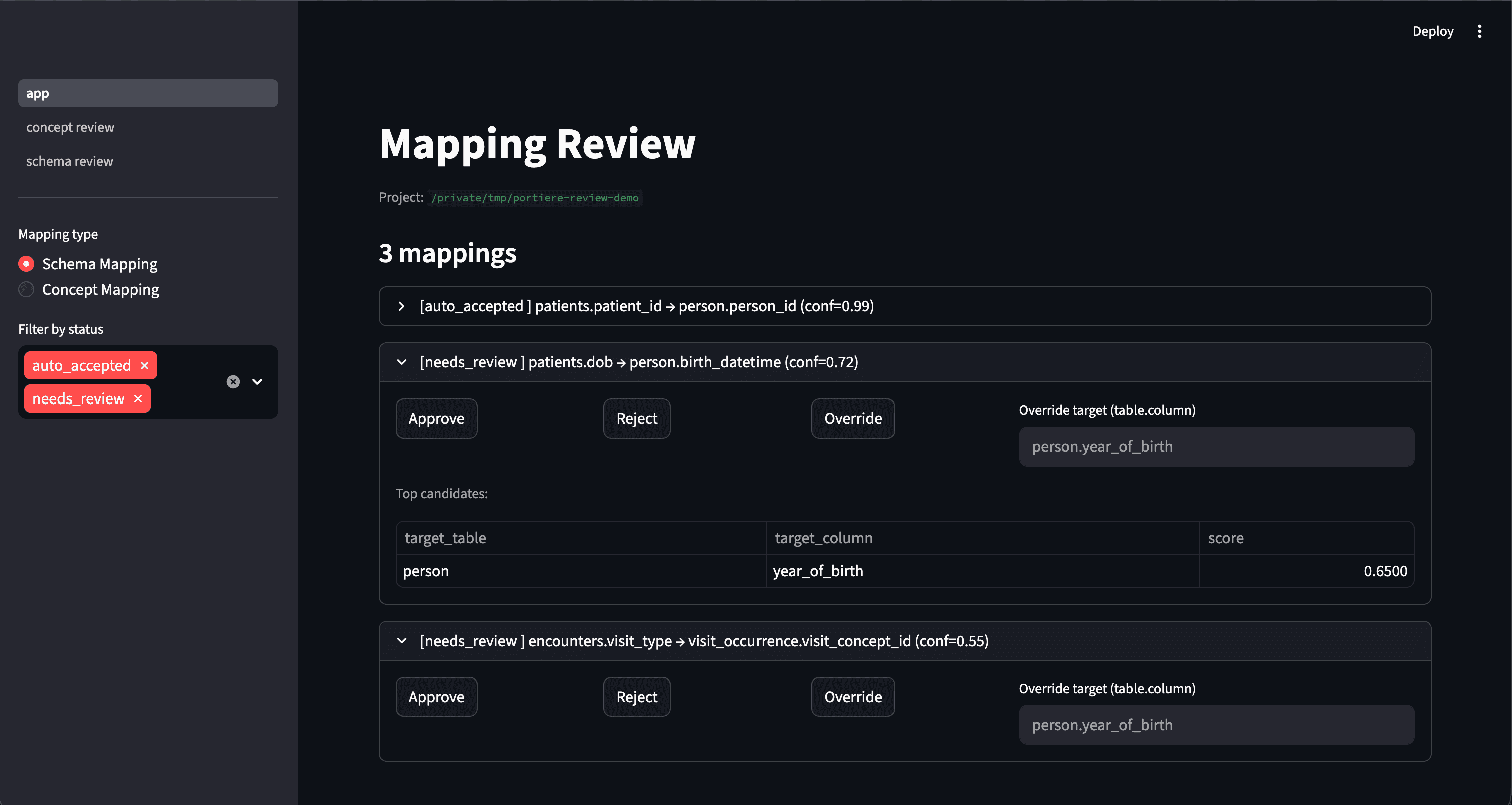
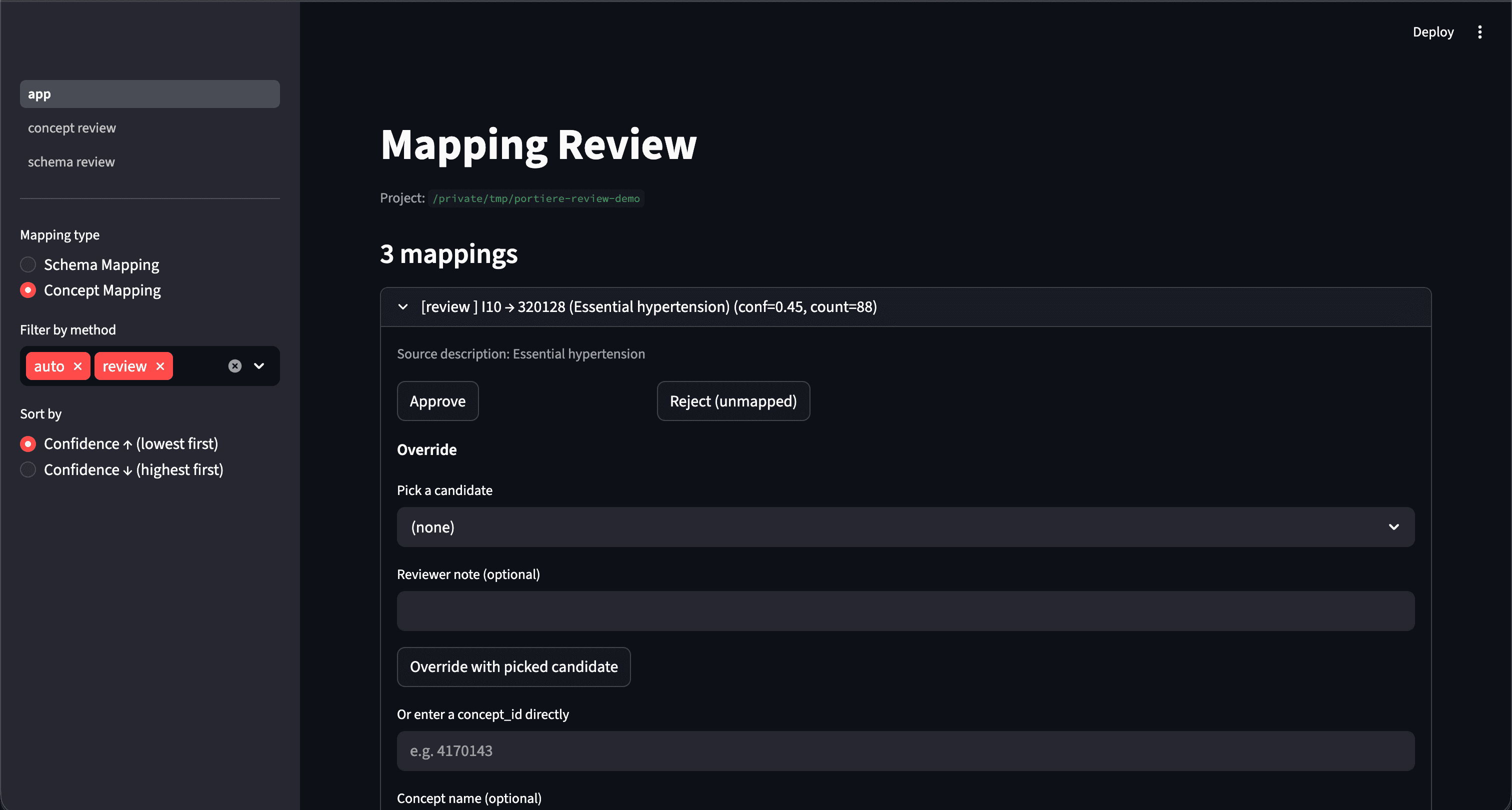
v0.3.1+Launch a local Streamlit UI to approve, reject, and override mappings interactively — without ever modifying your source-of-truth YAML.
Install & Launch
Reviewed decisions persist to schema_mapping_reviewed.json alongside your existing schema_mapping.yaml — the original YAML is never touched. The Python API stays the testable surface; this UI is a convenience layer on top.
# Install with the optional [review] extra (adds streamlit>=1.30)
pip install "portiere-health[review]"

# Launch the UI against any project directory
portiere review ./my-portiere-project
# → http://127.0.0.1:8501
#
# - Browse auto_accepted / needs_review / unmapped items
# - Approve, reject, or override interactively
# - Decisions persist to schema_mapping_reviewed.json
#   (your source-of-truth schema_mapping.yaml is never modified)
Export for Clinical SME Review
Export AI-generated mappings to CSV for your clinical Subject Matter Experts to review in Excel or Google Sheets. Reload their edits back into Portiere to finalize.
Step 1 — Export Mappings for Review
Export schema and concept mappings to CSV. Items are pre-categorized by confidence — SMEs focus on needs_review rows while high-confidence mappings are auto-accepted.
# Export mappings to CSV for SME review
concept_map.to_csv("concept_review.csv")
schema_map.to_csv("schema_review.csv")

# Preview what SMEs will see
df = concept_map.to_dataframe()
print(df.head())
#   source_code  source_description          source_column  source_count  target_concept_id  target_concept_name      target_vocabulary_id  target_domain_id  confidence  method
# 0 E11.9        Type 2 diabetes mellitus    diagnosis      42            201826             Type 2 diabetes mellitus  SNOMED                Condition         0.98        auto
# 1 R51          Headache                    diagnosis      18            378253             Headache                  SNOMED                Condition         0.96        auto
# 2 Z87.891      Personal history of NTD     diagnosis      7             4099154            History of nicotine dep.  SNOMED                Condition         0.74        review
# 3 X42.LOCAL    Custom lab code             lab_result     3             None               None                      None                  None              0.00        unmapped

print(concept_map.summary())
# {'total': 342, 'auto_mapped': 298, 'needs_review': 38, 'manual_required': 6}
Step 2 — Reload SME Edits & Generate ETL
After your SME reviews the CSV — approving, rejecting, or overriding rows — reload it back and generate production ETL. For OMOP targets, export the standard source_to_concept_map table directly.
# Reload SME-reviewed CSV back into the project
from portiere.models.concept_mapping import ConceptMapping

reviewed = ConceptMapping.from_csv("concept_review_edited.csv")
project.save_concept_mapping(reviewed)
print(reviewed.summary())
# {'total': 342, 'auto_mapped': 298, 'needs_review': 0, 'manual_required': 0}

# Export as OMOP source_to_concept_map for database loading
import pandas as pd
stcm = reviewed.to_source_to_concept_map()        # list[dict]
pd.DataFrame(stcm).to_csv("source_to_concept_map.csv", index=False)

# Generate ETL and validate
etl = project.run_etl(source, output_dir="./output")
report = project.validate(etl_result=etl)
print(report.summary())
# ✓ 342/342 concepts mapped | 5 ETL scripts | 0 validation errors
Explore the Documentation
Comprehensive guides covering everything from quickstart to production deployment.
Start Mapping Today
Open source, Apache 2.0-licensed, and free forever. Install with pip and start mapping clinical data in minutes.
pip install portiere-health